
Clutter Buddy: Home Inventory App
Stop searching. Start finding. Know what's in every box.
Clutter Buddy tracks everything you own — which box it's in, which shelf, which room. Search any item and get the exact path. Scan a QR code or NFC tag to see what's inside without opening a lid. Free, offline, no account required.


Features
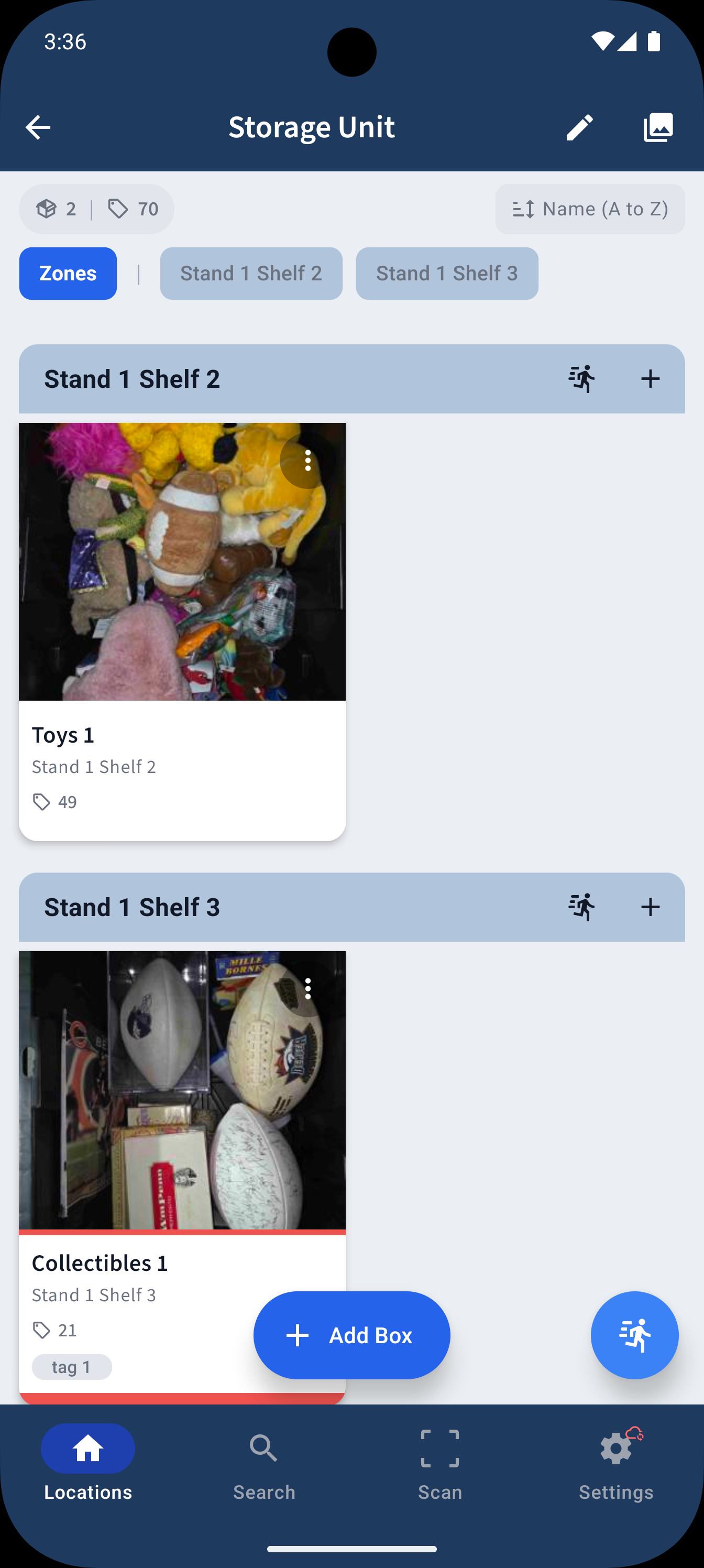
Organize by Location, Box & Item
Create locations — garage, attic, closet, storage unit — then add boxes and log every item inside. Build a complete home inventory you can search in seconds.
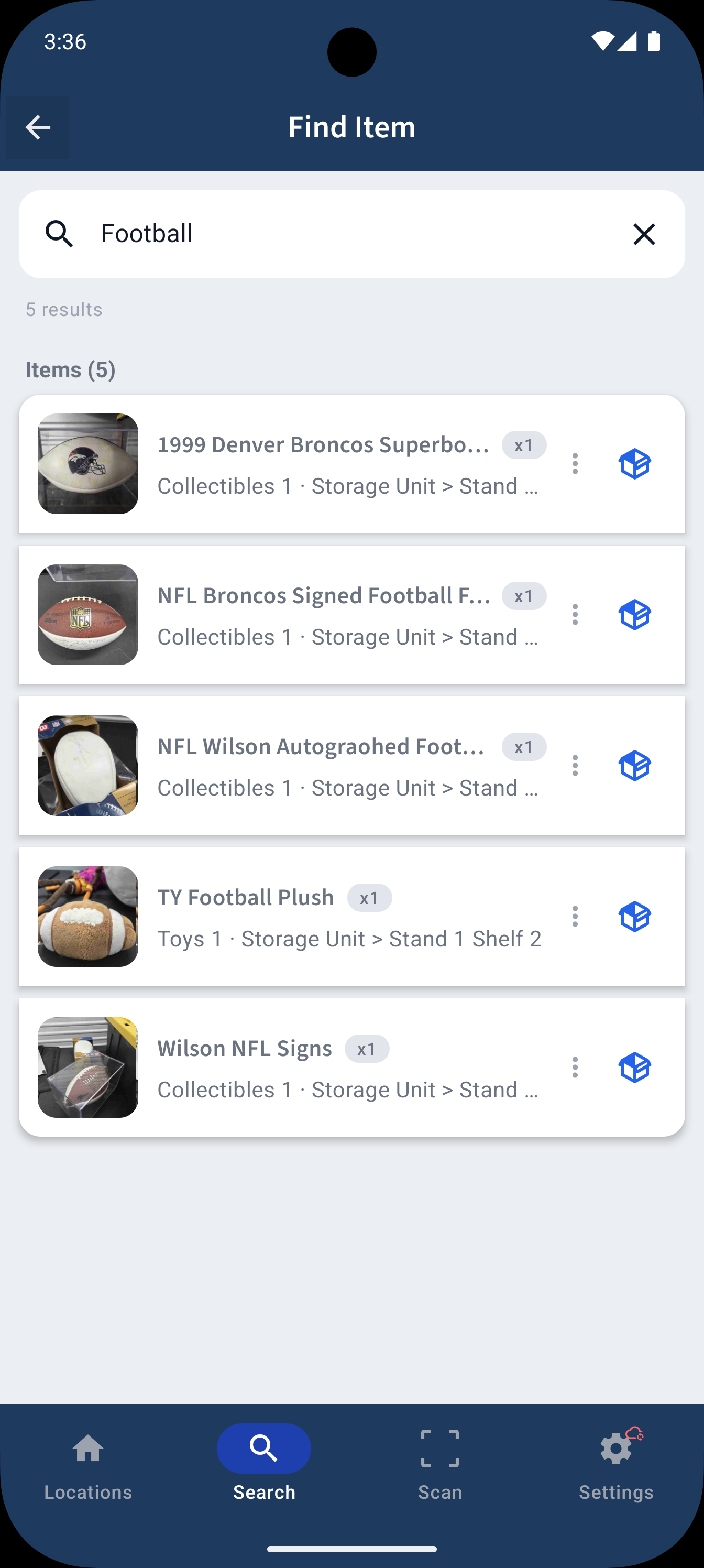
Find Anything in Seconds
Search across all your locations, boxes, and items at once. Results show the full path — Garage > Cabinet 3 > Shelf 2 > Box 1 — so you go straight to it.
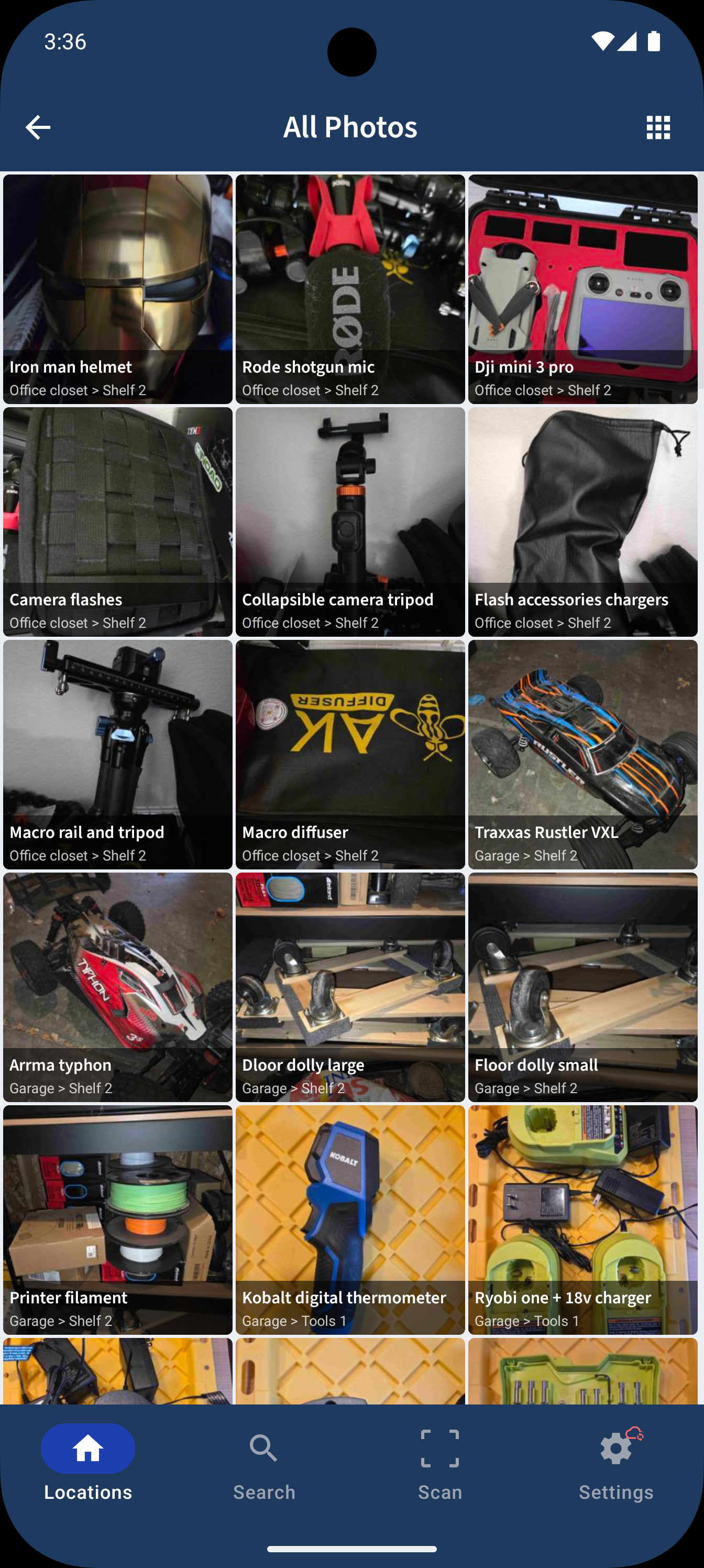
Photo Everything
Snap photos of items and boxes so you can browse visually. The Photo Gallery shows everything in a location without reading a single label.
Convert Excel to Clutter Buddy
Already have your inventory in a spreadsheet? Import your Excel file directly into Clutter Buddy — map your columns, preview, and download a ready-to-import file.
NFC Tag & QR Code Scanning
Link your boxes to QR codes or NFC tags. Generate QR codes from the app, print them off and stick them on your boxes. Walk up, scan, and instantly see everything inside — no more mystery boxes.
Tags, Colors & Custom Organization
Color-code and tag boxes and items. Sort by name, date, or last opened. Group boxes into zones. Move items between boxes or boxes between locations with a tap.
100% Free, Offline & Private
All your data stays on your device by default. No accounts, no subscriptions, no paywalls. Optional Google Drive backup if you want it.
How Clutter Buddy Organizes Your Stuff
Create Your Locations
Set up your storage areas — garage, attic, closet, basement, storage unit, spare room — wherever you keep things.
Add Boxes & Log Items
Add boxes, bins, and containers to each location. Log every item inside with photos, notes, and tags.
Search, Scan & Find
Search for any item and get the full path. Or stick a QR code or NFC tag on a box and scan it to see everything inside.
Who Clutter Buddy Is For
You can never find what you packed
You know it's in the garage somewhere — but which box? You open three, dig through two, and still come up empty. Clutter Buddy tells you exactly where to go: Garage > Shelf 2 > Box 3. One search, done.
You're packing or unpacking for a move
Moving is chaos. Clutter Buddy turns it into a system. Log what goes in each box as you pack, stick a QR code on the lid, and know exactly what's in every box when you unpack at the new place.
Your storage unit is a mystery
You're paying monthly for a unit full of boxes you haven't opened in years. Clutter Buddy lets you inventory everything so you can finally decide what to keep, donate, or toss — without driving there first.
You want to declutter and downsize
Hard to let go of things when you don't know what you have. Clutter Buddy gives you a full picture of your belongings so you can make confident decisions about what stays and what goes.
You're organizing seasonal stuff
Holiday decorations, seasonal clothes, camping gear — things you only touch once or twice a year. By the time you need them again, you've forgotten which box they're in. Clutter Buddy remembers so you don't have to.
You manage inventory for a small business
Track supplies, products, or equipment across multiple rooms or storage areas. Scan NFC tags or QR codes for quick lookups. Simple enough to set up in minutes, powerful enough to scale.
You need a record for insurance
If a fire, flood, or break-in ever happens, documenting what you owned makes a claim easier. Photograph and log your belongings now, backed up to your own cloud, and you'll have a home contents inventory you can use to help support an insurance claim.
Why I Built Clutter Buddy
My dad has always had a ton of stuff and could never find any of it. One day I saw him walk out with ten pieces of paper stapled together — his inventory of everything he owned. Scribbles all over the place, stains on the paper, folded and falling apart. That started me down the path of building this app.
I guessed at what would help and tried to make something for him. He used it, but didn't really like it. I tried to build what he wanted, but I failed at first.
Then a few years later, I ended up in a similar situation. We had a storage unit full of boxes and every time I needed something I couldn't find it. Now I knew how he felt — and I had the experience he couldn't convey to me before. After a few months of trial and error from my own frustrations and a dozen iterations later, I was able to build something that actually worked for me.
So back to my dad I went. I let him play around with it and we had a much better starting point. He was able to tell me what he felt was missing and what was confusing, and together we hashed out an app that worked for both of us.
Now I want to share it with everybody else. Clutter Buddy is completely free and everything stays on your phone. You can sync it to your personal cloud so that if something happens to your phone or you upgrade, you still have access to all the work you've done.
Common Questions About Organizing Your Stuff
How do I organize my garage so I can actually find things?+
The most effective way to organize a garage is to inventory every box and container, then label them with a searchable system. Clutter Buddy lets you create locations like shelves and zones, add boxes to each one, and log every item inside. When you need something, search for it and get the exact path — Garage > Shelf 2 > Box 3. You can also stick QR codes or NFC tags on boxes and scan them to see what's inside without opening a lid.
How do I keep track of my stuff when I have too many boxes?+
When you have dozens of boxes across your home, garage, attic, or storage unit, the key is a digital inventory that mirrors your physical layout. Clutter Buddy lets you build nested locations (room > shelf > box), log items with photos and tags, and search across everything at once. Instead of opening box after box, you search once and know exactly where to go.
How do I keep track of everything when moving to a new house?+
As you pack, log what goes into each box using Clutter Buddy. Generate a QR code for each box and tape it to the lid. When you arrive at your new place, scan any box to see exactly what's inside — no more opening everything to find your coffee maker. Your entire moving inventory stays searchable on your phone.
How do I organize a storage unit I haven't touched in years?+
Start by going through each box and logging its contents in Clutter Buddy. Take photos of items, tag them, and note their location. Once everything is inventoried, you can decide what to keep, donate, or toss — without driving to the unit every time you need to check what's there. You'll finally know what you're paying to store.
What is the best way to label and track boxes?+
The best approach is combining physical labels with a digital inventory. Clutter Buddy lets you generate QR codes you can print and stick on boxes. Scan the code with your phone and instantly see the full contents list. For reusable containers, NFC tags work even better — tap your phone to the tag and everything inside appears on screen.
How do I make a home inventory for insurance?+
After a fire, flood, or theft, an insurance claim goes more smoothly when you can document what you owned. Use Clutter Buddy to photograph each item, note where it's kept, and tag it by room or category. Everything is searchable and backed up to your own Google Drive, so even if the originals are lost you still have a documented home contents inventory for renters or homeowners insurance. Clutter Buddy helps you keep your own record — it doesn't guarantee any claim outcome, so keep your backups enabled and check your policy's documentation requirements.
Is Clutter Buddy free?+
Yes, Clutter Buddy is 100% free with no subscriptions, no paywalls, and no ads. All your data stays on your device by default, with optional Google Drive backup if you want it. Available on both iOS and Android.
Now That You're Organized...
You've unpacked all the boxes — now who's cleaning up? Split the chores fairly with Chore Chores, figure out what to eat with CravePath, or wind down with a twist on movie night with Guess The Trope.
 Split the Chores
 Decide What to Eat
 Movie Night Game
Find What You're Looking For — Right Now
Download Clutter Buddy and stop digging through boxes. 100% free, 100% offline, no account required.